
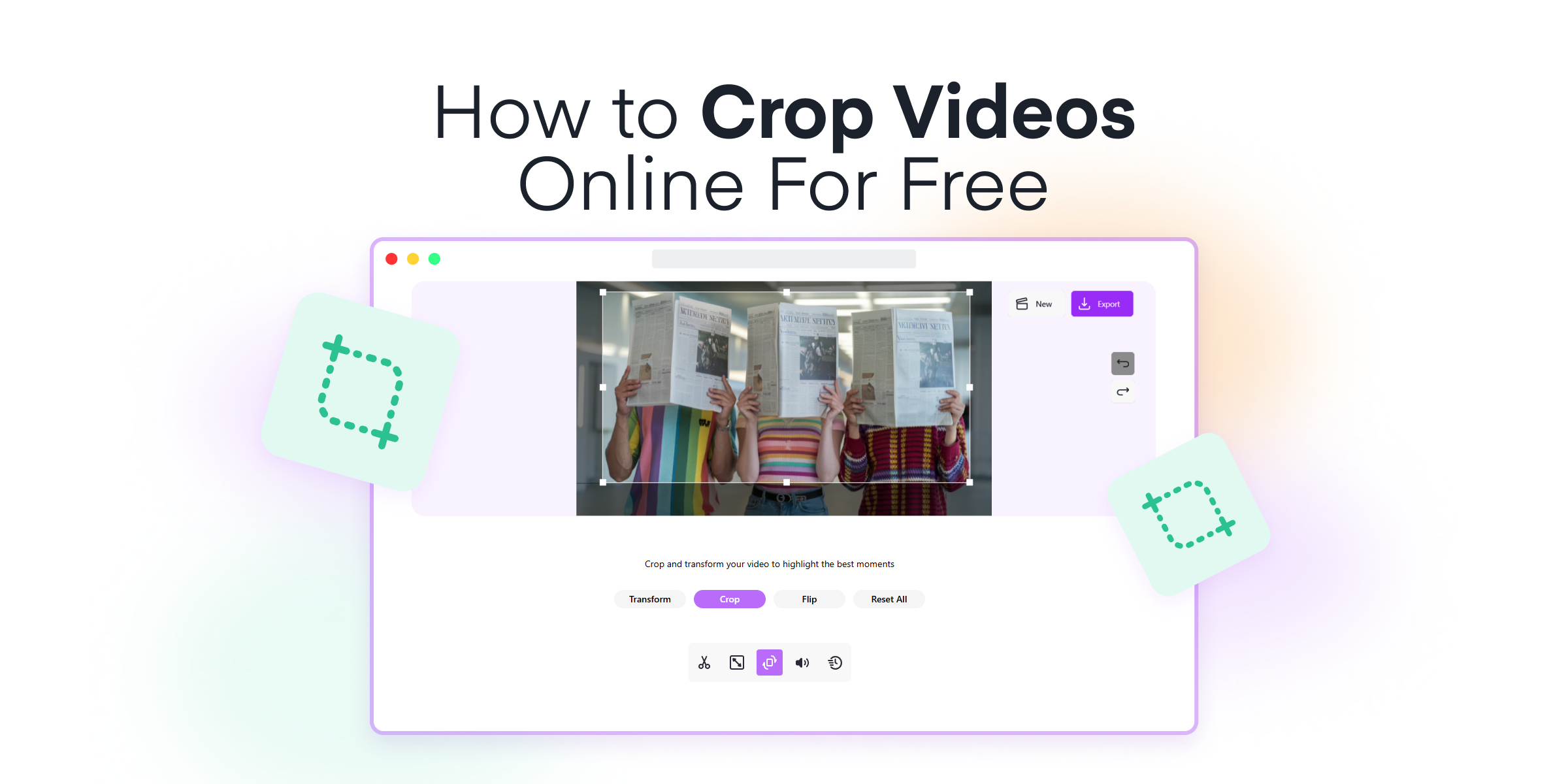
Ever found yourself needing to crop videos for a project, social media post, or maybe a presentation, but unsure where to begin? Look no further. Mixilab Toolkit makes it incredibly simple to crop videos right in your browser without any need for software installation. Whether you’re a novice or a seasoned video editor, this step-by-step guide will walk you through the process effortlessly.
In this guide, you’ll learn:
- How to navigate to Mixilab Toolkit and select the Crop Tool
- Steps to upload your video file easily
- Adjusting the cropping frame or using precise pixel dimensions
- Exporting your cropped video in the desired resolution and bitrate
Ready to dive in? Let’s get started with your video cropping journey!
Contents
Why Choose Mixilab: Key Benefits and Features
Mixilab Toolkit is designed with the user in mind, offering a host of benefits that cater to both novice and experienced video editors. Here’s why Mixilab Toolkit stands out:
- No software installation required: Skip the hassle of downloading and installing software. Mixilab allows you to edit directly in your browser, making the process quicker and more convenient.
- Supports multiple formats: From MP4 to AVI and MOV, Mixilab handles a variety of video formats. This versatility ensures that you can work with almost any video file you have.
- Completely free: Enjoy unlimited video cropping without worrying about costs. Mixilab provides its editing tools entirely free of charge, with no hidden fees or watermarks to obscure your content.
- High-quality output: Maintain control over your video’s resolution and quality. Whether you need a crisp 4K video for YouTube or a 720p one for quicker uploads, Mixilab caters to your preferences.
Using Mixilab’s online video editor, you can crop videos to perfection and ensure they meet your specific needs. This ease of use and wide range of features make it an ideal tool for anyone looking to enhance their video content efficiently.
How to Crop a Video Online for Free in 4 Easy Steps
If you’ve ever faced the need to trim down your videos to focus on the essential parts or make them perfect for social media, Mixilab Toolkit is what you need. It’s browser-based, user-friendly, and requires no installation, making video cropping an absolute breeze. Let’s walk through the straightforward steps to get your videos just the way you want them.
1. Visit Mixilab Toolkit and Choose the Crop Tool
First, head over to Mixilab Toolkit. Here, you’ll find a variety of editing tools designed to cater to different video editing needs. This page serves as a one-stop video editing hub, packed with features ranging from basic edits to more advanced options.
Once you’re on the Toolkit’s page, take a moment to familiarize yourself with the different tools available. You’ll see tools for trimming, rotating, and performing various other edits on both videos and photos. However, for cropping, you’ll want to focus on selecting the Crop Tool from the list.
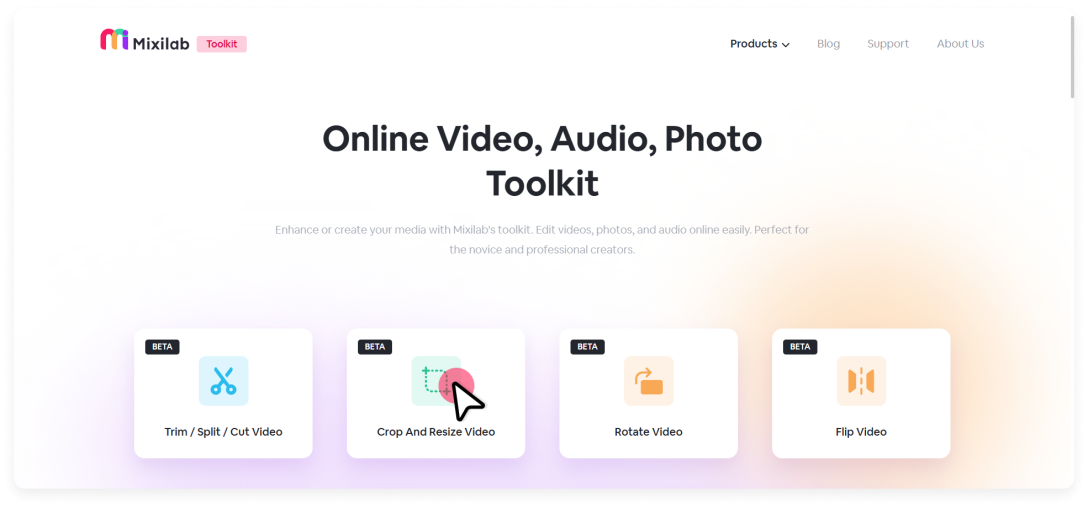
Mixilab Toolkit’s interface is designed to be intuitive, so you’ll find the right tool in no time. The navigation is straightforward, ensuring even beginners can locate and start using the necessary tools quickly and efficiently.
2. Upload Your Video
Next, you’ll need to upload your video to get started. Simply click the Select Video button prominently displayed on the interface.
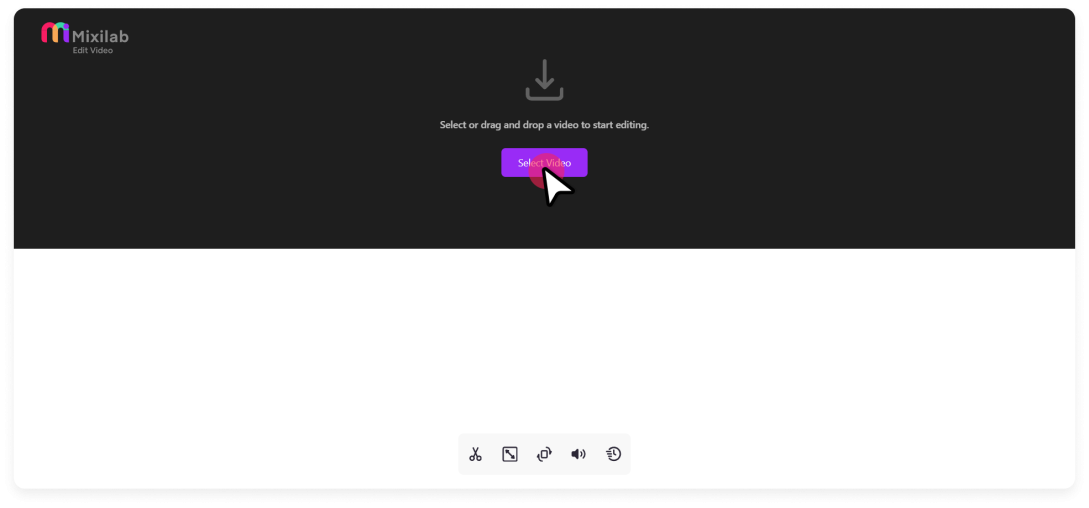
A file explorer window will pop up, allowing you to choose the video file from your computer. Whether your video is in MP4 or MOV, Mixilab has you covered.
The platform supports a broad range of video formats, ensuring you can upload almost any type of video you have on hand without any compatibility issues. This versatility makes it especially convenient for users who work with different types of video files.
3. Use the Selected Area Frame or Enter Desired Pixel Dimensions to Crop a Video
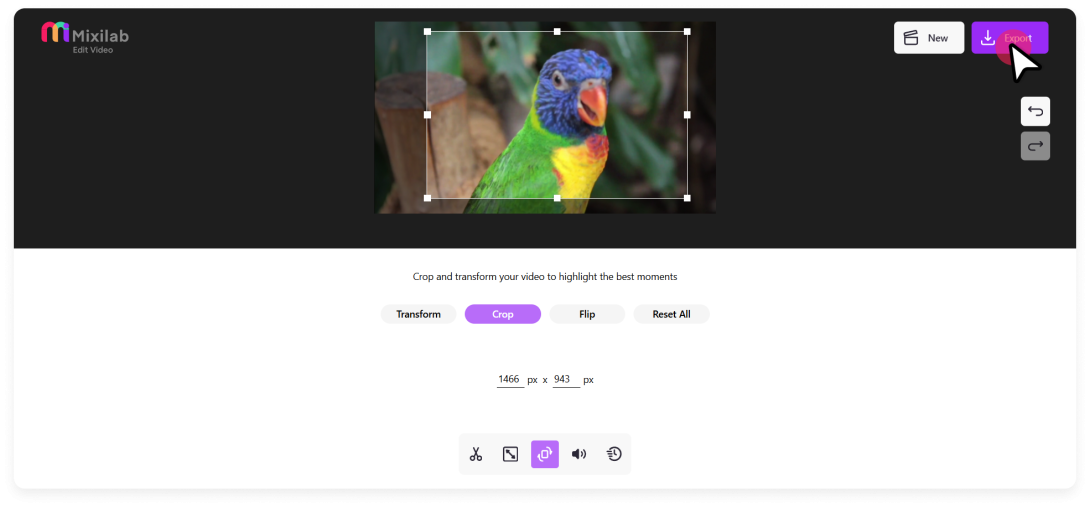
Once your video is uploaded, you’ll see an interactive cropping frame on the screen.
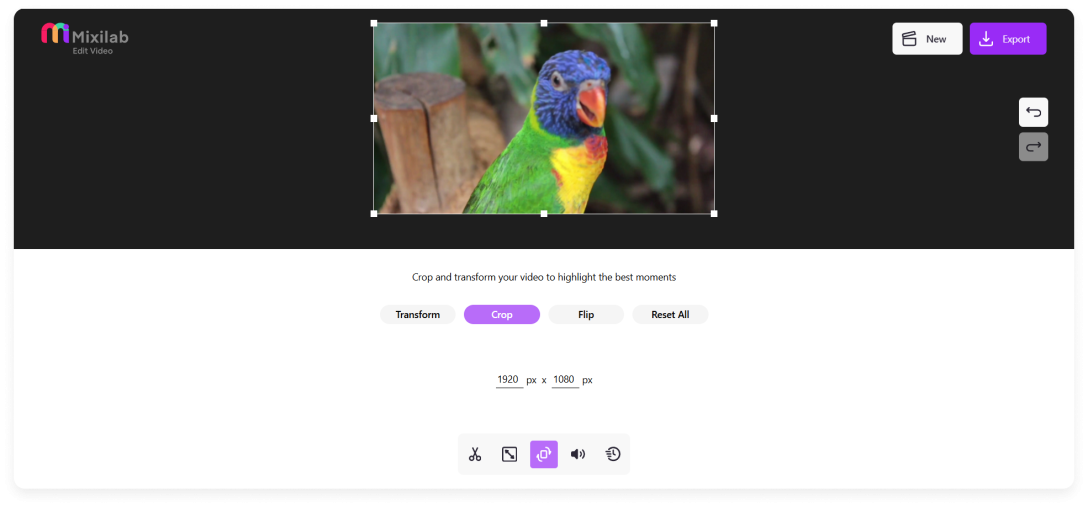
This frame allows you to manually adjust its size and position by clicking and dragging the corners or edges, ensuring you can highlight exactly the area you want to keep in your video.
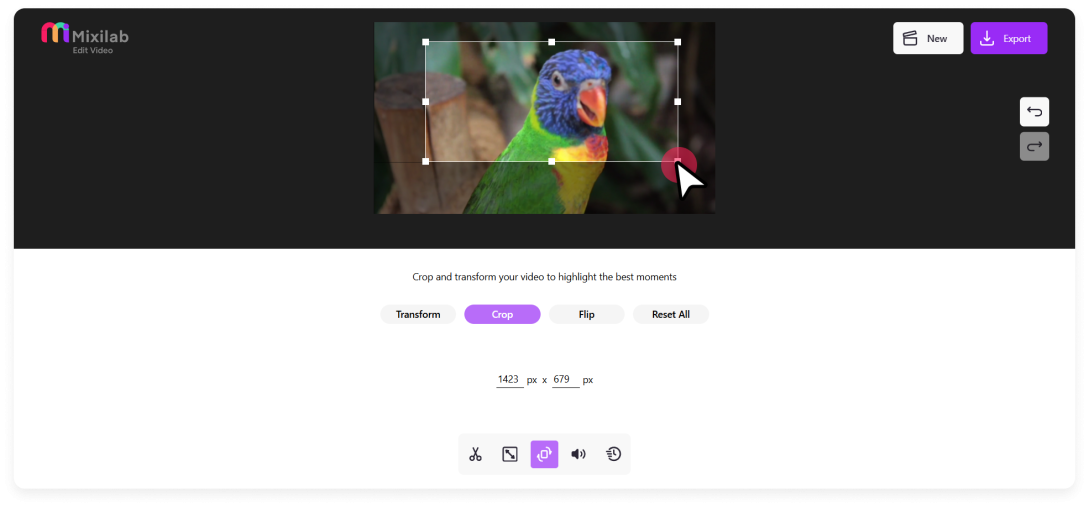
If you require more precision, you can input the exact height and width dimensions in pixels. This feature is particularly useful when you need to maintain a specific aspect ratio, like a perfect square for Instagram posts, a vertical frame for TikTok, or a widescreen format for YouTube videos.
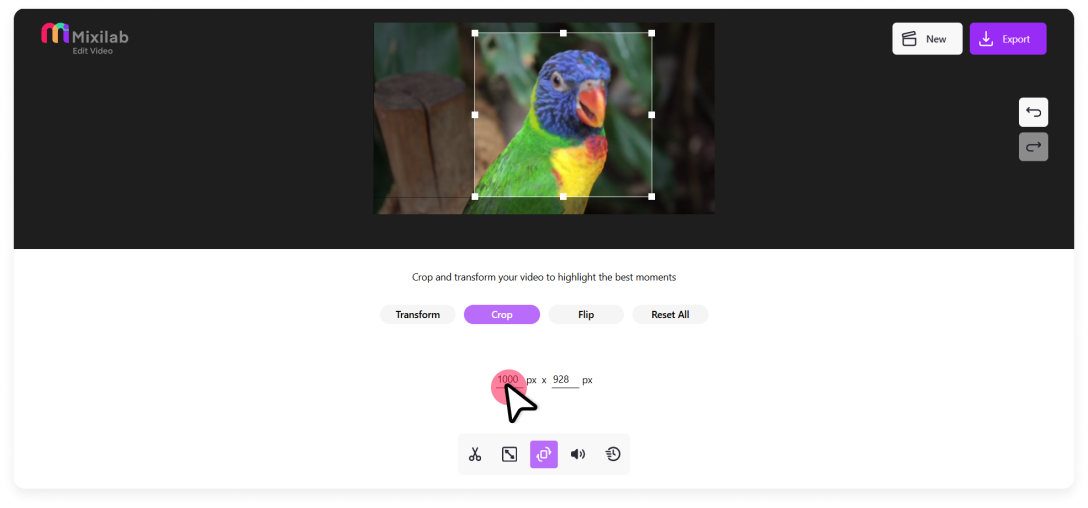
By entering these values, you ensure that your video meets the exact requirements of each platform, preserving the quality and impact of your content.
This combination of manual adjustment and precise dimension input makes creating a perfectly cropped video both easy and reliable, catering to various project requirements with ease.
4. Export Cropped Video
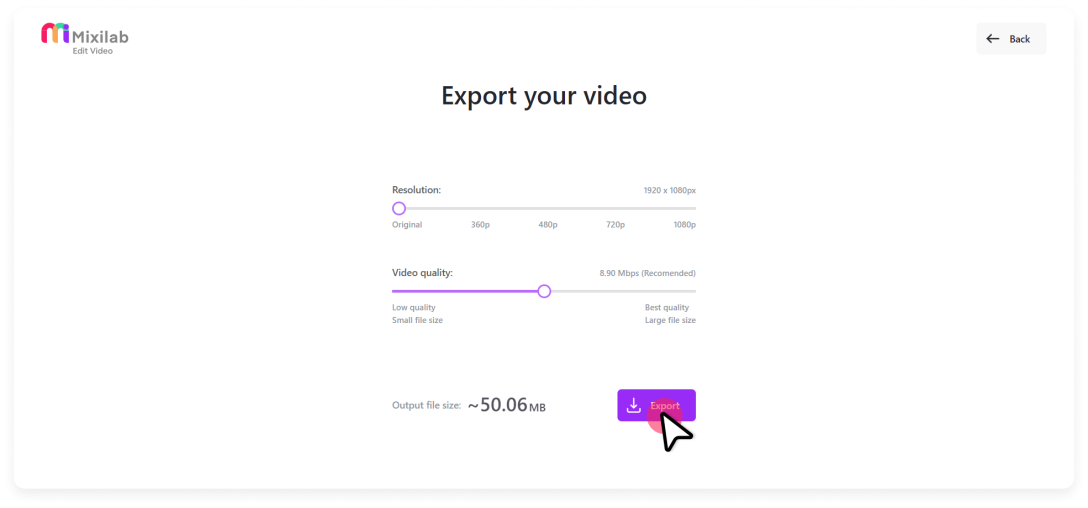
Finally, click the Export button and choose your preferred resolution and bitrate for the exported video.
Mixilab Toolkit offers a range of resolution options, so you can pick the best quality for your platform or usage needs—whether it’s 1080p for YouTube or 720p for quicker, smaller downloads.
Mixilab Toolkit is not only user-friendly but also completely free of charge. It supports multiple formats, provides high-quality output, and doesn’t impose any hidden fees or restrictions.
Bringing It All Together
In conclusion, cropping videos using Mixilab Toolkit is a seamless and intuitive process suitable for users of all skill levels. With no need for software installation, you can:
- Quickly access the comprehensive Toolkit page.
- Upload a variety of video formats.
- Easily adjust the crop area using the interactive frame or by entering exact dimensions.
- Finalize your project with the export feature, selecting your preferred resolution and bitrate for high-quality output.
If you’re looking for a similar guide for a Windows PC, then check out Animotica’s guide on how to crop a video on Windows.
Mixilab’s user-friendly and free-to-use interface, alongside its support for multiple formats and high-quality export options, makes it an ideal tool for any video cropping needs.
Start cropping your videos effortlessly with Mixilab Toolkit today!


72 Comments
Thanks for sharing. I read many of your blog posts, cool, your blog is very good.
Can you be more specific about the content of your article? After reading it, I still have some doubts. Hope you can help me. https://accounts.binance.com/en-IN/register-person?ref=UM6SMJM3
I don’t think the title of your article matches the content lol. Just kidding, mainly because I had some doubts after reading the article.
I don’t think the title of your article matches the content lol. Just kidding, mainly because I had some doubts after reading the article.
Your point of view caught my eye and was very interesting. Thanks. I have a question for you.
Thank you for your sharing. I am worried that I lack creative ideas. It is your article that makes me full of hope. Thank you. But, I have a question, can you help me?
Thanks for sharing. I read many of your blog posts, cool, your blog is very good.
Your point of view caught my eye and was very interesting. Thanks. I have a question for you.
Thanks for sharing. I read many of your blog posts, cool, your blog is very good.
I don’t think the title of your article matches the content lol. Just kidding, mainly because I had some doubts after reading the article.
Can you be more specific about the content of your article? After reading it, I still have some doubts. Hope you can help me.
Your point of view caught my eye and was very interesting. Thanks. I have a question for you.
Thanks for sharing. I read many of your blog posts, cool, your blog is very good.
Your point of view caught my eye and was very interesting. Thanks. I have a question for you.
Your point of view caught my eye and was very interesting. Thanks. I have a question for you.
Your point of view caught my eye and was very interesting. Thanks. I have a question for you.
Your article helped me a lot, is there any more related content? Thanks!
Can you be more specific about the content of your article? After reading it, I still have some doubts. Hope you can help me. https://accounts.binance.com/pt-PT/register?ref=DB40ITMB
Thank you, your article surprised me, there is such an excellent point of view. Thank you for sharing, I learned a lot.
Thank you for your sharing. I am worried that I lack creative ideas. It is your article that makes me full of hope. Thank you. But, I have a question, can you help me? https://accounts.binance.com/en/register-person?ref=W0BCQMF1
Thanks for sharing. I read many of your blog posts, cool, your blog is very good. https://accounts.binance.com/zh-TC/register?ref=P9L9FQKY
Can you be more specific about the content of your article? After reading it, I still have some doubts. Hope you can help me.
Your article helped me a lot, is there any more related content? Thanks!
Your point of view caught my eye and was very interesting. Thanks. I have a question for you.
Can you be more specific about the content of your article? After reading it, I still have some doubts. Hope you can help me.
Your point of view caught my eye and was very interesting. Thanks. I have a question for you.
Your point of view caught my eye and was very interesting. Thanks. I have a question for you. https://www.binance.info/de-CH/register?ref=UM6SMJM3
I don’t think the title of your article matches the content lol. Just kidding, mainly because I had some doubts after reading the article.
Your point of view caught my eye and was very interesting. Thanks. I have a question for you. https://www.binance.com/zh-TC/register?ref=VDVEQ78S
I don’t think the title of your article matches the content lol. Just kidding, mainly because I had some doubts after reading the article. https://www.binance.info/register?ref=P9L9FQKY
Your point of view caught my eye and was very interesting. Thanks. I have a question for you.
Thank you for your sharing. I am worried that I lack creative ideas. It is your article that makes me full of hope. Thank you. But, I have a question, can you help me?
Your point of view caught my eye and was very interesting. Thanks. I have a question for you.
Your point of view caught my eye and was very interesting. Thanks. I have a question for you.
Thanks for sharing. I read many of your blog posts, cool, your blog is very good.
Your article helped me a lot, is there any more related content? Thanks! https://www.binance.com/pt-PT/register?ref=KDN7HDOR
Your article helped me a lot, is there any more related content? Thanks!
Thank you for your sharing. I am worried that I lack creative ideas. It is your article that makes me full of hope. Thank you. But, I have a question, can you help me? https://accounts.binance.info/register-person?ref=IXBIAFVY
I don’t think the title of your article matches the content lol. Just kidding, mainly because I had some doubts after reading the article.
Because the admin of this website is working, no uncertainty very shortly it will be well-known, due to its quality contents.
Your point of view caught my eye and was very interesting. Thanks. I have a question for you.
Your point of view caught my eye and was very interesting. Thanks. I have a question for you.
What i don’t realize is in reality how you’re not really a
lot more smartly-favored than you may be right now.
You are very intelligent. You know therefore
significantly on the subject of this subject, produced me for
my part believe it from so many numerous angles. Its like men and
women don’t seem to be interested except it is one thing to accomplish
with Girl gaga! Your personal stuffs great. Always maintain it
up!
Amazing! Its genuinely amazing piece of writing, I have got much clear idea on the topic of
from this paragraph.
I want to to thank you for this excellent read!! I absolutely enjoyed every bit of
it. I’ve got you book-marked to check out new things you post…
Hi! I know this is sort of off-topic but I had to ask. Does building a well-established website like yours take a lot of work? I’m brand new to running a blog however I do write in my journal everyday. I’d like to start a blog so I will be able to share my experience and feelings online. Please let me know if you have any kind of recommendations or tips for new aspiring blog owners. Thankyou!
I don’t think the title of your article matches the content lol. Just kidding, mainly because I had some doubts after reading the article.
Can you be more specific about the content of your article? After reading it, I still have some doubts. Hope you can help me.
Your point of view caught my eye and was very interesting. Thanks. I have a question for you.
Your point of view caught my eye and was very interesting. Thanks. I have a question for you.
I have been browsing on-line more than three hours lately, but I never discovered any fascinating article like yours. It’s pretty price sufficient for me. In my opinion, if all website owners and bloggers made just right content as you did, the net will be much more useful than ever before.
I was wondering if you ever considered changing the page layout of your website? Its very well written; I love what youve got to say. But maybe you could a little more in the way of content so people could connect with it better. Youve got an awful lot of text for only having one or 2 images. Maybe you could space it out better?
Howdy are using WordPress for your site platform? I’m new to the blog world but I’m trying to get started and set up my own. Do you need any html coding expertise to make your own blog? Any help would be really appreciated!
Your article helped me a lot, is there any more related content? Thanks!
I absolutely love your blog and find almost all of your post’s to be just what I’m looking for. can you offer guest writers to write content available for you? I wouldn’t mind composing a post or elaborating on some of the subjects you write with regards to here. Again, awesome blog!
What a stuff of un-ambiguity and preserveness of valuable familiarity concerning unpredicted feelings.
Your point of view caught my eye and was very interesting. Thanks. I have a question for you. https://accounts.binance.com/ru/register-person?ref=O9XES6KU
I don’t even know how I ended up here, but I thought this post was good. I don’t know who you are but definitely you are going to a famous blogger if you aren’t already 😉 Cheers!
I’ve been browsing on-line greater than 3 hours as of late, yet I never discovered any attention-grabbing article like yours. It is beautiful value enough for me. Personally, if all web owners and bloggers made just right content as you did, the internet will probably be a lot more useful than ever before.
Admiring the time and energy you put into your blog and in depth information you offer. It’s awesome to come across a blog every once in a while that isn’t the same outdated rehashed information. Excellent read! I’ve saved your site and I’m including your RSS feeds to my Google account.
I was suggested this web site by my cousin. I am not certain whether or not this submit is written by him as nobody else know such specified about my problem. You’re amazing! Thanks!
You really make it appear so easy together with your presentation however I find this matter to be really one thing which I think I might never understand. It kind of feels too complex and very broad for me. I am looking ahead for your next publish, I’ll try to get the dangle of it!
you’re in reality a good webmaster. The web site loading pace is incredible. It kind of feels that you’re doing any unique trick. Moreover, The contents are masterpiece. you’ve done a wonderful job on this subject!
Hello my family member! I want to say that this article is amazing, nice written and include almost all important infos. I would like to look more posts like this .
Hurrah! Finally I got a blog from where I be able to actually take helpful data concerning my study and knowledge.
I don’t even know how I ended up here, but I thought this post was good. I don’t know who you are but definitely you’re going to a famous blogger if you aren’t already 😉 Cheers!
Can you be more specific about the content of your article? After reading it, I still have some doubts. Hope you can help me.
What’s Taking place i am new to this, I stumbled upon this I’ve discovered It absolutely useful and it has aided me out loads. I am hoping to contribute & assist other customers like its aided me. Good job.
Hi there, You have done a great job. I will definitely digg it and personally recommend to my friends. I am confident they will be benefited from this web site.
Hi everyone, it’s my first pay a visit at this website, and piece
of writing is truly fruitful in support of me, keep up posting such articles.
I’ve been browsing online greater than 3 hours as of late, but I by no means discovered any interesting article like yours. It’s lovely worth sufficient for me. In my view, if all web owners and bloggers made excellent content as you did, the net can be a lot more useful than ever before.
I visited various sites but the audio quality for audio songs present at this website is truly excellent.